If you didn’t figure it out already by the title of the post, this one is about how to map an NVMe-TCP datastore back to a Pure Storage volume by viewing what is known as the EUI ID. In this blog post, I will cover one way to do this as well as explain what is an EUI ID.
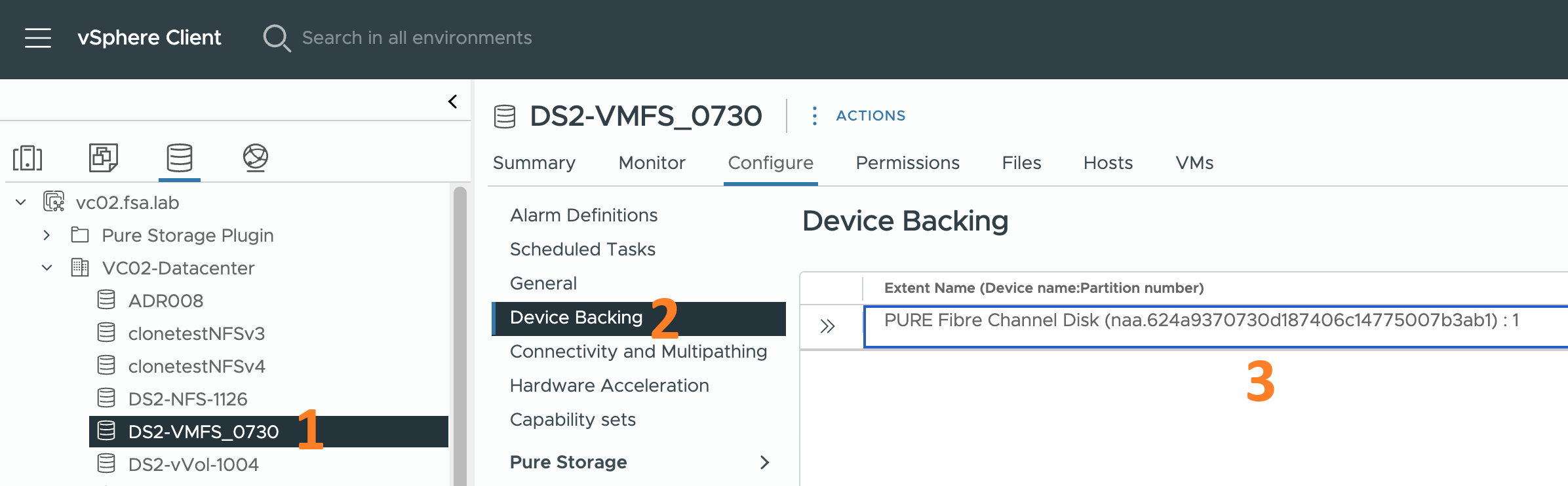
I was recently on a call with the storage team for a customer and they were still tracking LUN IDs so they could map them back to a VMware datastore in vCenter. When I noticed them doing this, I let them know they don’t really need to do this anymore. In vCenter it is quite easy to map a datastore back to a Pure Storage volume by viewing what is known as the NAA ID. In this blog post, I will cover one way to do this as well as explain what is an NAA ID.

When deploying an OVA in vSphere 8, it is not uncommon for the workflow to flag the OVA publisher certificate as untrusted. This can be a significant issue for organizations that prioritize security. In this blog post, I will cover how to overcome this issue.
The Problem
Deploying an OVF Template/OVA is a common operation for a VMware Administrator. You right-click on the ESX Cluster or an ESX host in the inventory browser and click Deploy OVF Template. This action initiates the Deploy OVF Template workflow. Typically, there are ten steps to this workflow. The first three steps ask for: