
Identifying Pure Storage SCSI Volumes in VCenter
In this blog post I'm going to cover a method to identify a SCSI (FC or iSCSI) datastore in vCenter and map it back to a Pure Storage volume.
I was recently on a call with the storage team for a customer and they were still tracking LUN IDs so they could map them back to a VMware datastore in vCenter. When I noticed them doing this, I let them know they don’t really need to do this anymore. In vCenter it is quite easy to map a datastore back to a Pure Storage volume by viewing what is known as the NAA ID. In this blog post, I will cover one way to do this as well as explain what is an NAA ID.
What is an NAA ID?
When a new block-based storage device/volume is presented to an ESXi host over a SCSI protocol like iSCSI or Fibre Channel it issues the SCSI INQUIRY command to get more information about it. The returned data is used to generate a unique identifier for the storage device. This unique identifier is referred to as the NAA ID or the Network Addressing Authority (NAA) identifier. This identifier is unique across hosts and it persists even after a reboot of the host. The format of this identifier is managed by the InterNational Committee on Information Technology Standards (INCITS, pronounced “insights”) and associcated technical committees:
Here is an example of an NAA ID:
naa.624a9370730d187406c14775007b3ab1
Where can I find an NAA ID?
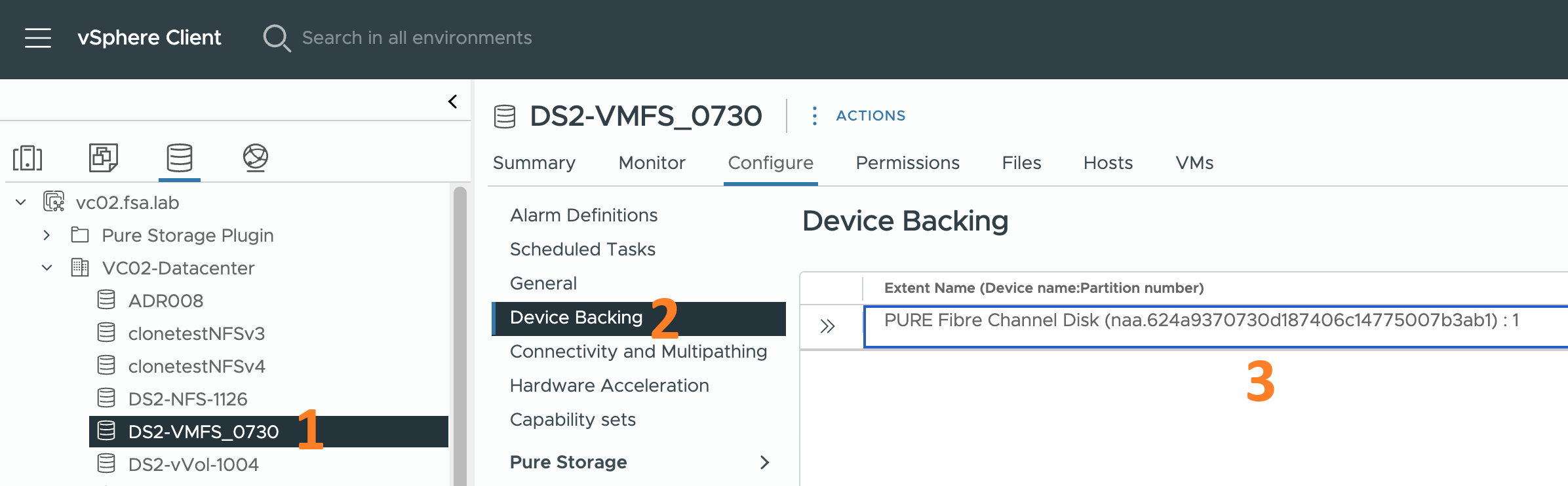
You can see the ID via a few different ways. The first would be to look in vCenter by following the steps below:
- Click on a datastore being hosted on a Pure Storage FlashArray
- Click on the Configure tab of the datastore
- Click on Device Backing
At this point the NAA ID will be displayed to the right.
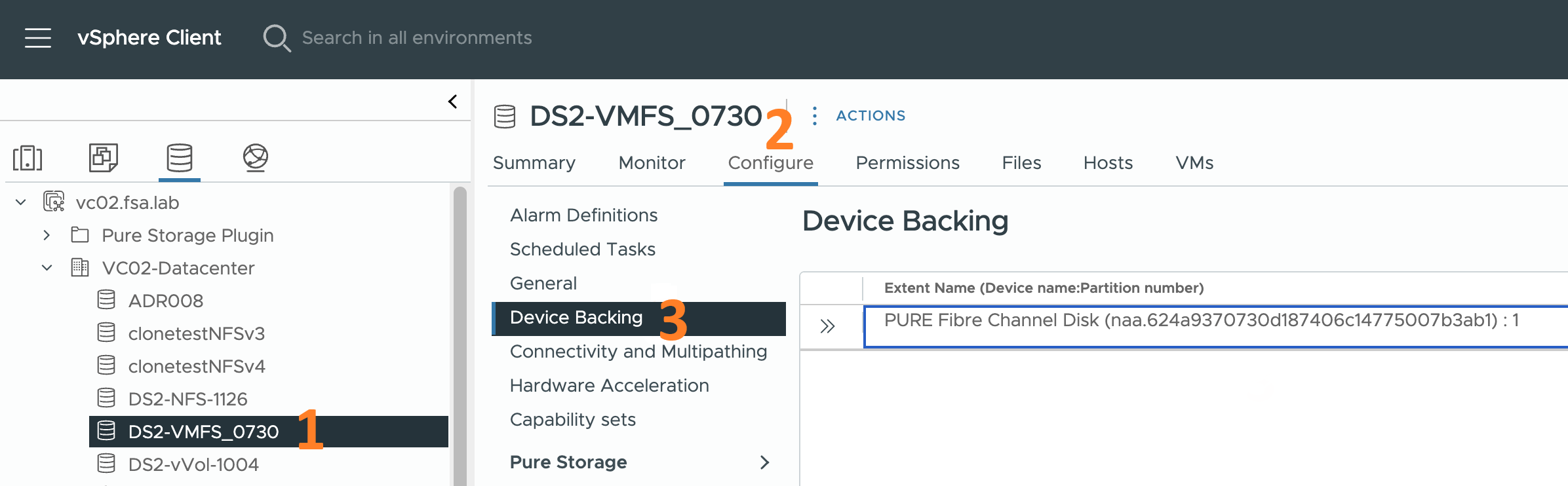
NAA ID in vCenter
The other way to view the NAA ID is to use the esxcli storage core device list command. Simply SSH into one of your ESX hosts and run the command. You will see output similar to what I shown below. This is just a snippet of the full output.
# esxcli storage core device list
naa.624a9370730d187406c14775007b3ab1
   Display Name: PURE Fibre Channel Disk(naa.624a9370730d187406c14775007b3ab1)
   ...
   Size: 63963136
   Device Type: Direct-Access
   Multipath Plugin: NMP
   Devfs Path: /vmfs/devices/disks/naa.624a9370730d187406c14775007b3ab1
   Vendor: PURE
   Model: FlashArray
   ...
   Other UIDs: vml.0200f90000624a9370730d187406c14775007b3ab1466c61736841
   ...
Break down of an NAA ID
At first glance an NAA ID looks like gobbledy gook. Fortunately, once you know the “formula,” of an NAA ID it’s easy to determine which datastores are backed by a Pure Storage volume.
Let’s take the NAA identifier for a vSphere datastore accessed over a SCSI protocol. This one happens to be a Fibre Channel volume.:
naa.624a9370730d187406c14775007b3ab1
Here is the “formula” for breaking down that identifier:
| Segment | Length (Hex Digits) | Value | Role in NAA Structure |
|---|---|---|---|
| 1 | 1 | naa.6 | Designator Type: Indicates a LUN identifier (specifically, NAA Registered Extended Format). This is fixed for this type of identifier. |
| 2 | 7 | 24a9370 | Pure Storage OUI (Organizational Unique Identifier): The vendor-assigned IEEE identifier for Pure Storage, the base OUI is 24a937. |
| 3 | 16 | 730d187406c14775 | Array ID (WWN) and Unique ID Prefix: This segment combines the Pure FlashArray’s unique ID and the beginning of the volume’s unique identifier. |
| 4 | 8 | 007b3ab1 | Volume Unique ID Suffix (Volume Serial Suffix): This is the final unique part of the volume’s identifier on the array. This is the final unique part of the volume’s identifier on the array. |
Conversion to Pure Volume Serial Number
The final Pure Volume Serial Number is formed by concatenating the Pure Array ID (WWN) and Unique ID Prefix along with the Pure Volume ID Suffix.
Pure Volume Serial = Array ID + Volume Suffix
- Pure Array ID (WWN): 730D187406C14775
- Pure Volume Identifier Suffix: 007B3AB1
- Concatenate: 730D187406C14775 + 007B3AB1
The resulting 24-digit hexadecimal volume serial number is: 730D187406C14775007B3AB1 This is the serial number you would use to search for the volume directly on the Pure Storage FlashArray using the GUI or the following CLI command:
purevol list | grep -i 730D187406C14775007B3AB1
vSphere Plugin Assist
If you are using the Pure Storage vSphere plugin, then by selecting the Summary tab for the datastore you don’t need to go through all of the steps above. Simply look in the widget and the serial number will be there.
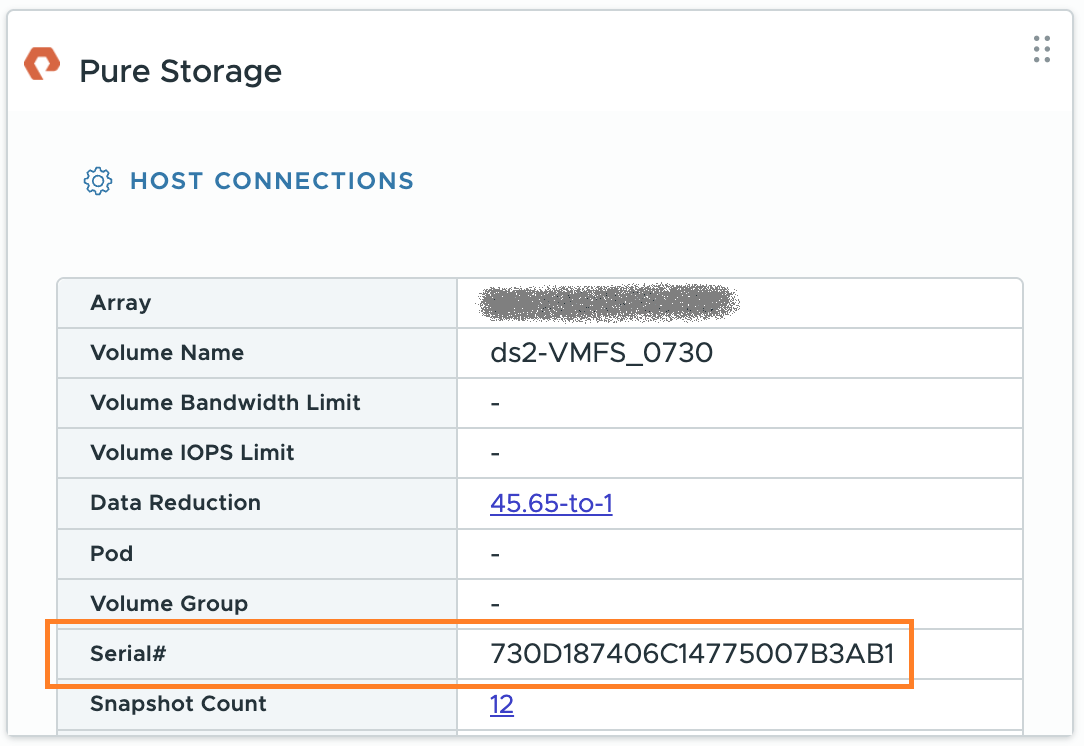
Volume serial number in Pure Storage Plugin widget
Broadcom Techdocs
While doing some research for this post I ran into several Broadcom technical documents on this subject. Here are a few of them that pertain to this topic.
- ESX Storage Device Names and Identifiers
- Viewing Storage Devices Available to ESX Hosts
- Display Storage Devices for an ESX Host
- Display Storage Devices for an Adapter
Summary
Let’s summarize what we covered in this post:
- I mentioned what is an NAA ID
- I mentioned how to find an NAA ID in vSphere
- I broke down the format of an NAA ID
- I explained how to convert an NAA ID to a Pure Storage volume serial number
Series Table of Contents
Here are links to the rest of the series:
If there is something you think I’m missing and feel should be added/corrected, please let me know.
Thanks for reading!